Clasa logo
Trusted by educators worldwide

Free AI Detector for Typed and Handwritten Text

See which sentences and phrases look AI-generated. Paste text, upload a file or take a photo of handwritten work.

No text yet? Try a , or sample.

0 / 5,000

Featured on There's An AI For ThatDetects ChatGPT, Claude, Gemini, DeepSeek, Llama, Grok and moreNever used to train AI

  • Sentence & phrase highlights
  • Typed or handwritten
  • Editable report
  • Grade it with a rubric
Why Clasa

An AI Checker That Shows Its Work

A good AI checker gives you more than a number. Clasa shows you where to look in an essay, research paper or article, and why.

See where to look, and why

Clasa highlights each sentence that looks AI-generated. Phrase view goes further and marks the exact words behind each flag.
Check handwritten work too

Take a photo of a handwritten page, check the text Clasa reads from it, and run the same check.

Add your review, then grade it

Add your notes to the report, or grade the same essay with your rubric, all in one place.

The result is a likelihood, not a verdict. Use it to decide where to look more closely.

The complete toolkit

Everything You Need to Check Writing for AI

A free AI content detector for teachers, students and writers, from your first check to your final review.

Overall score

An Overall Score You Can Explain

Every check gives you one AI likelihood score for the whole text, from 0 to 100%. Each sentence also gets its own likelihood, so you can point to the exact lines that raised the score.

Any writing

Works for Essays, Homework and More

Use it as an AI detector for essays, homework, research papers and college application essays, or for articles, blog posts and cover letters. Upgrade when you need to check longer texts.

Any format

Paste, Upload or Snap a Photo

Paste text, upload a PDF, Word or text file, or take a photo of a page. Clasa pulls out the text for you, and you can fix anything before the check runs.

Multilingual

Checks Writing in 27 Languages

Check writing in English, Spanish, French, German, Portuguese, Chinese, Arabic and 20 more languages. Clasa picks up the language on its own.

Privacy

Your Text Stays Yours

We never use your text to train AI models. Checks you run while signed in are saved in your documents, and you can delete them at any time.

Free to start

Free to Start, No Sign-Up

Run your first checks without an account. Sign up to save your checks, and upgrade when you need more.

How it works

How to Check Text for AI in 3 Steps

Checking text with this free AI detection tool takes three steps and no setup.

  1. Step 1

    Add your text

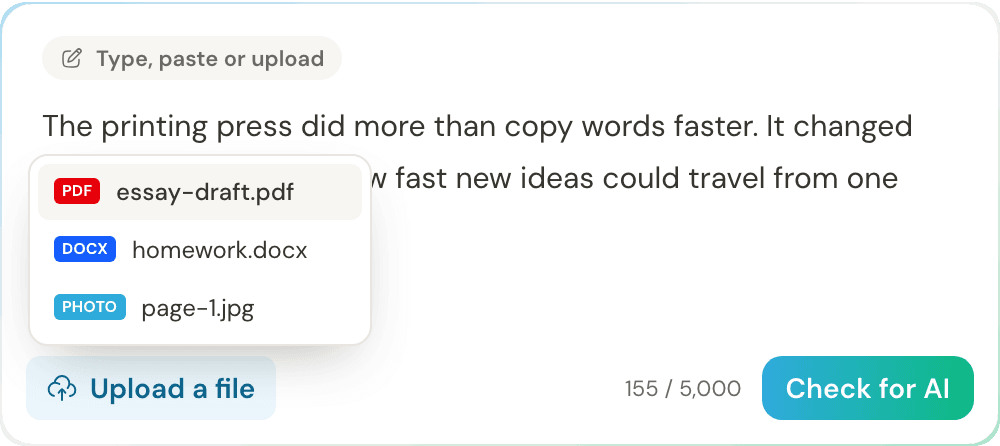
    Type or paste your text, upload a file or take a photo of a handwritten page. For photos, check the text Clasa reads and fix any misread words before you go on.

    Clasa AI detector text box with an essay pasted in and an upload menu for a PDF, Word document or photo
  2. Step 2

    Run the AI check

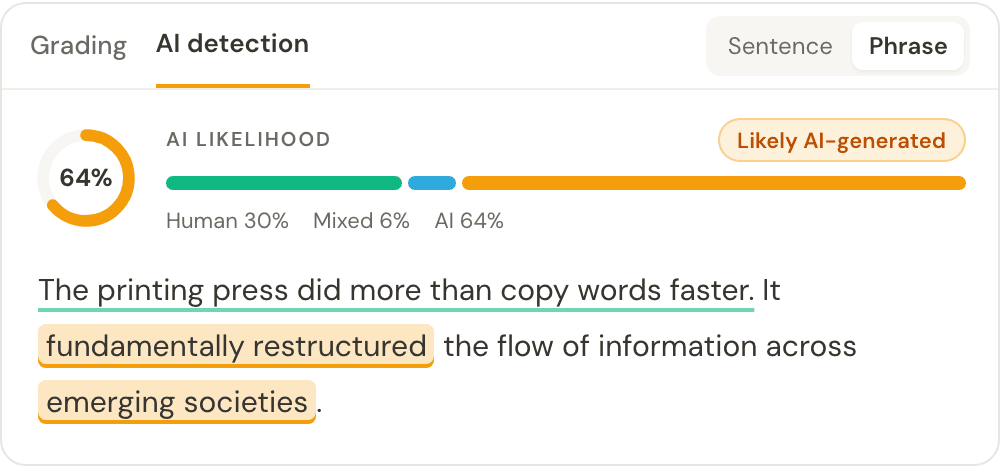
    Select Check for AI. In a few seconds, you’ll see an overall AI score and the sentences that look AI-generated. Switch to phrase view to see the exact words behind each flag.

    AI detection result showing a 64% AI likelihood, likely AI-generated, with AI-written phrases highlighted in phrase view
  3. Step 3

    Review, add notes or grade

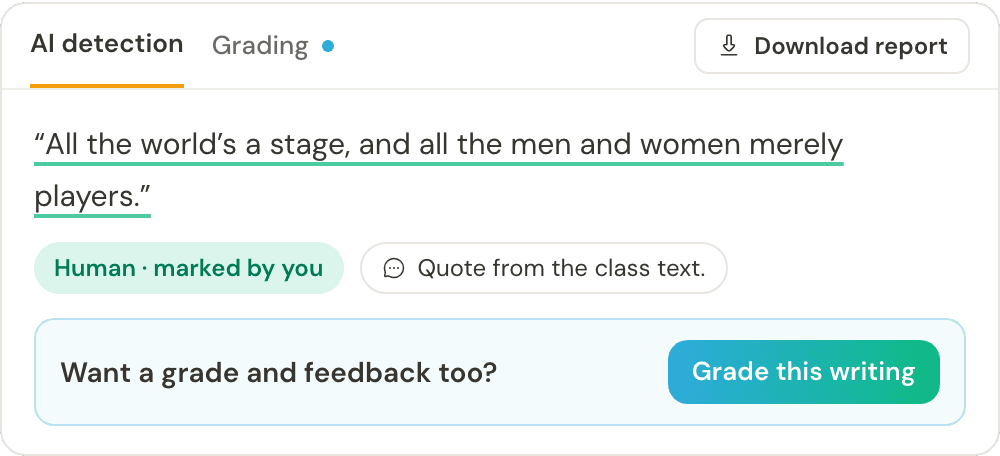
    Read the highlights in context. If you know more than the tool does, relabel a sentence or add a note. Then download the report, or open the Grading tab to score the same text against a rubric.

    AI detection report with a sentence marked human by the reviewer, a note, a Download report button and an option to grade the writing
Handwritten work

Detect AI in Handwritten Essays and Notes

Clasa works as a handwritten AI detector: it checks a photo of a handwritten page the same way it checks typed text.

Why Check Handwritten Work for AI?

Many teachers have moved essays back to paper to limit AI use. But a handwritten page only shows who held the pen. A student can generate an essay with AI at home and copy it out by hand. Clasa checks the words, not the handwriting.

Writing done in class, under supervision, is still the strongest evidence of who wrote it. For handwritten homework and take-home essays, a check gives you a starting point for a conversation, not a verdict.

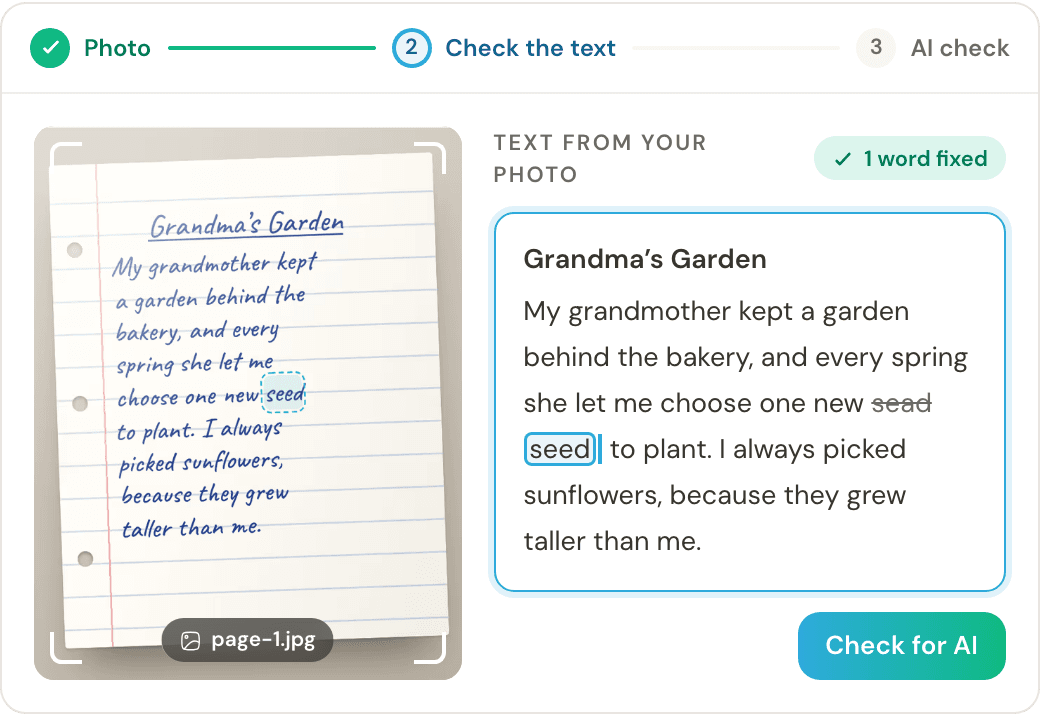
Handwritten AI detector: a photo of a handwritten essay next to the text Clasa read from it, with one misread word fixed

How to Check a Handwritten Page

  1. Take a clear photo of the whole page.
  2. Let Clasa turn the handwriting into text.
  3. Fix any misread words or missing phrases.
  4. Run the AI check and review the highlights.

Fixing the text matters. A misread word can change a sentence, and the result. Each check reads one photo, so check a longer essay one page at a time.

For a clear photo

  • Lay the page flat in good light.
  • Fit the whole page in the frame.
  • Keep the writing in focus. Dark ink reads best.
Use results fairly

How to Read Your AI Detection Results

An AI detector shows which parts of a text read like AI writing. It can’t tell you who wrote it, or why.

What Does the Overall Score Mean?

A score of 72% means the detector finds the whole text 72% likely to be AI-generated. It doesn’t mean 72% of the text came from AI, and it says nothing about the writer’s intent.

What Do the Highlights Mean?

Each color labels one sentence. Blue means the signals are unclear, neither clearly human nor AI. Treat any highlight as a reason to reread, not as proof.

Are AI Detectors Accurate?

No AI detector is 100% accurate, Clasa included. The style and length of a text, and the AI model behind it, can all affect the result. A high score doesn’t prove AI use, and a low score doesn’t prove human writing. Formulaic or highly polished writing can look AI-generated. Very short texts give any detector little to go on.

What to Do When Writing Is Flagged

A score should never be the only evidence behind a decision.

If you’re reviewing someone’s workTeachers, professors, editors and managers
  1. Read the flagged passages in context.
  2. Compare the work with the writer’s earlier writing.
  3. Look at drafts, notes and version history.
  4. Talk with the writer about how they wrote it.
  5. Follow your school’s or workplace’s policy.
If your own work was flaggedStudents, writers and freelancers
  1. Keep your drafts, notes and version history.
  2. Read the flagged sentences in context.
  3. Be ready to explain how you wrote it.
  4. Be open about any AI help, as your policy asks.
  5. If a result looks wrong, say so and share your drafts.
Your review, on the record

An AI Detection Report You Can Edit

Add your own judgment to the AI detection report before you share it. The detector’s first pass and your review stay together in one document.

Relabel sentences

Mark a highlighted sentence as human-written when you have context the detector doesn’t, such as a line the student wrote in class.

Add notes

Comment on the whole report or on one sentence, such as “Drafts shown in class.”

Edit the summary

Word the overall finding to match what you concluded after your review.

Your notes sit next to the detector’s original result, so anyone reading the report sees both. Editing is for recording an informed review, not for changing a result you don’t like.

AI detection reportEditedDownload
72%AI likelihoodDetector’s first pass, kept in the report
Your summaryEditing

Two sentences were flagged as AI-generated. The opening line was written in class, so I marked it human-written.

BIUHumanAIMixedEconomic shifts often reshape communities in lasting ways. Ultimately, resilience and innovation remain essential for navigating such transitions. My dad still drives two hours each way to work.
What it detects

Detect ChatGPT, Claude, Gemini and Other AI Models

Use Clasa as a ChatGPT detector, or to check work drafted with Claude, Gemini and other AI writing tools.

Made for mixed writing

One draft can mix human and AI text. Clasa marks it sentence by sentence, so you can see where each part sits.

Works across 27 languages

The same check runs in Spanish, Arabic, Japanese and 24 more, and Clasa spots the language for you.

No need to guess the tool

You don’t have to know which AI tool was used. One check looks for patterns common in AI writing.

New models come out often

Whatever tool was used, read the result alongside the writing itself.

Who it’s for

Who Uses Clasa’s AI Detector?

Students checking their own work, teachers reviewing a class set, and anyone who needs to know where a piece of writing came from.

Illustration of a student

Students

Worried your essay will be flagged? Use Clasa as an AI detector for students and check your work before you hand it in, so there are no surprises.

Illustration of a teacher

Teachers & Professors

An AI detector for teachers that works on typed and handwritten essays. Check homework, add notes to the report, then grade the same work with your rubric.

Illustration of a school team

Schools & Departments

Use one AI checker for teachers across a department, so everyone reads results the same way and every student gets a fair chance to explain.

Illustration of a writer

Writers & Editors

An AI detector for writers and editors. Check drafts and freelance submissions, and add notes where a flagged passage needs context.

Illustration of a content team

Content & SEO Teams

Run articles through an AI content detector before you publish, next to editing and source checks. It won’t tell you if content is good or will rank.

Illustration of a recruiter

Businesses & Recruiters

Use an AI text detector on cover letters, applications and reports. Style alone won’t show who wrote a document, so treat the result as one input.

Plans for every writer

Find your Ideal Plan

Every plan includes AI detection and essay grading with your rubrics. Pick the one that matches how much you check.

Prices in
  • Starter

    For solo teachers who grade regularly with AI-assisted feedback.

    $9 / month

    Included in this plan

    • Advance AI Essay Grading
    • Basic AI Detection
    • 20 AI Detection Calls / Day
    • AI Rubric Builder
    • Unlimited Essay Grader calls
    • 50,000 Words per Month
    • 15,000 Characters per Scan
    • Standard Support
  • Popular

    Value

    For educators grading at volume with unlimited chats and richer history.

    $29 / month

    Included in this plan

    • Advance AI Essay Grading
    • Advanced AI Detection
    • Detection Phrase Level Analysis
    • AI Rubric Builder
    • Unlimited Essay Grader calls
    • Unlimited AI Detector Scans
    • 500,000 Words per Month
    • 20,000 Characters per Scan
    • Priority Support
    • Plus every core grading feature.
  • School

    For teams who split grading across educator seats with pooled quotas.

    $79 / month

    Included in this plan

    • 3 Educator Seats
    • Advance AI Essay Grading
    • Advanced AI Detection
    • Detection Phrase Level Analysis
    • AI Rubric Builder
    • Unlimited Essay Grader calls
    • Unlimited AI Detector Scans
    • Unlimited Words Graded per Month
    • Priority Support
    • Plus every core grading feature.

Create a free account first — no payment until you upgrade.

Done with the AI Check? Now Grade Your Writing

Many teachers now set an AI rule for each assignment, so a fair grade needs two answers: how the essay was likely written, and how good the writing is. Once the AI check is done, grade the same text with your rubric. You’ll get a score and feedback next to the AI result, with no need to paste it again.

Grade your writing freeFree to start. Use your own rubric or one of 600+ ready-made ones.
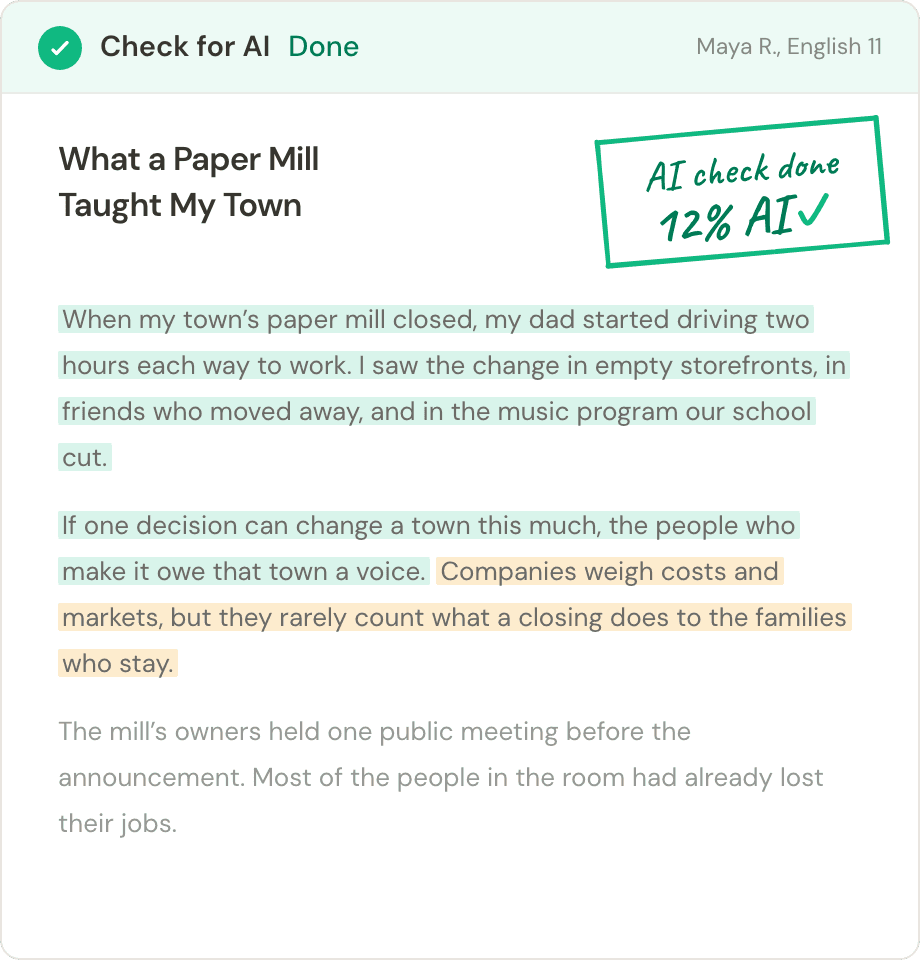
Student essay after an AI check, 12% AI, with each sentence highlighted as human-written or AI-generated
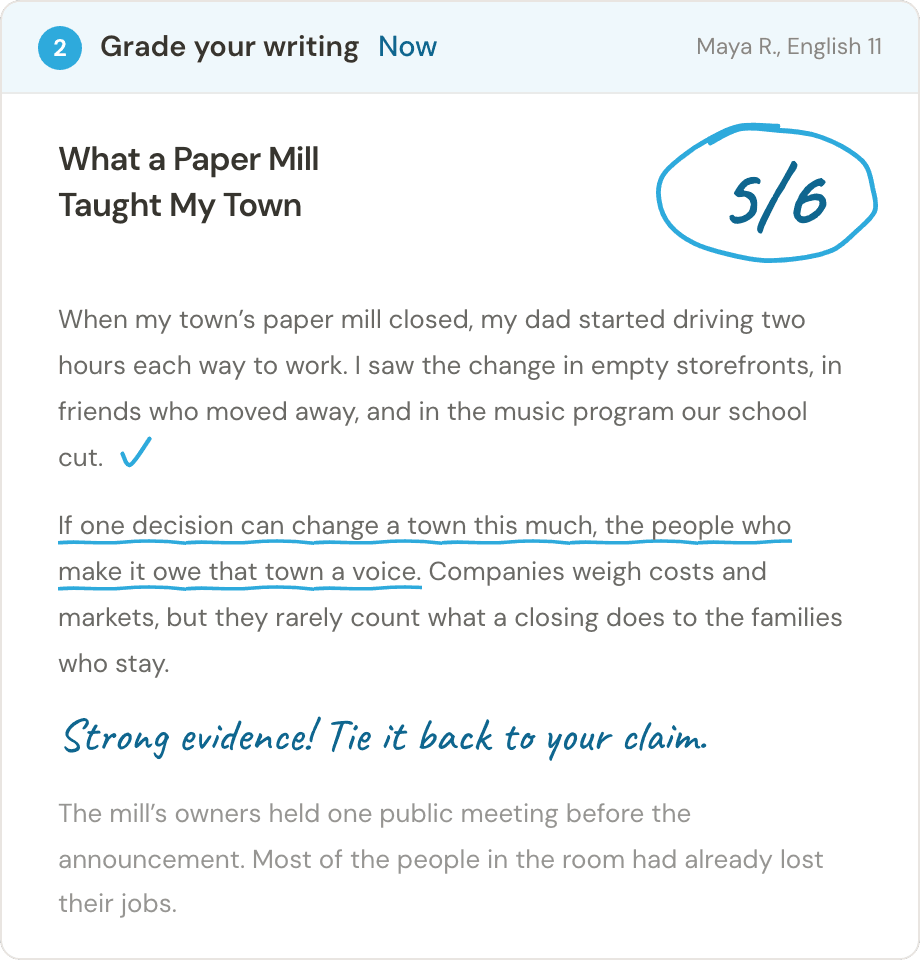
The same essay graded with a rubric: 5 out of 6, with pen marks and a teacher’s comment
Frequently asked questions

AI Detector FAQs

Quick answers about using a free AI detector, reading your results and keeping your text private.

Using the detector

What is an AI detector?

An AI detector estimates how likely it is that a text was written by an AI tool such as ChatGPT. Clasa scores the whole text and each sentence, so you can see which parts to read more closely.

Is Clasa’s AI detector free?

Yes. You can run your first checks free, without an account. Upgrade when you need longer texts, more checks or phrase highlights.

How do I check if a text was written by AI?

Paste the text, upload a file or add a photo of a handwritten page, then select Check for AI. Read the score and the highlighted sentences next to drafts or earlier work before you decide anything.

Can it detect ChatGPT, Claude and Gemini?

Yes. One check covers ChatGPT, Claude, Gemini, DeepSeek, Llama, Grok and other models, so you don’t need to know which tool was used. The result won’t say which model wrote the text.

Can students get around AI detection by writing by hand?

No. Copying AI text onto paper keeps the same words, and the check looks at the words. Take a photo of the page and check it like typed text.

Which languages does the AI detector support?

It works in 27 languages, including English, Spanish, French, German, Chinese and Arabic. Clasa detects the language of your text automatically.

Results and accuracy

How does the AI detector work?

It looks for patterns common in AI-generated writing and gives each sentence a likelihood. Together, those sentence scores make up one overall score for the text.

How accurate is Clasa’s AI detector?

Clasa is built to spot writing from both closed and open-source AI models, from ChatGPT, Claude and Gemini to Llama and DeepSeek. It scores every sentence, not just the whole text, so even a few AI-written lines in a human essay can stand out. The check works the same way in all 27 languages it supports. Like any AI detector, it gives a likelihood, so read flagged sentences in context before you act.

Can it detect text that’s only partly written by AI?

Yes. Each sentence gets its own label, so you can see where human and AI writing may mix within one piece.

Should a teacher penalize a student based on an AI score?

No, not on the score alone. Talk with the student, look at their drafts and earlier work, and follow your school’s policy.

I wrote it myself. Why was it flagged as AI?

Some human writing reads like AI, especially very formal or formulaic text, writing smoothed by grammar tools and short pieces. Detectors can be wrong, so share your drafts and version history to show how you wrote it.

Reports and privacy

Can I edit the AI detection report?

Yes. You can relabel sentences, add notes and reword the summary. The detector’s original result stays in the report next to your changes.

Is my text stored or shared?

Your text is never used to train AI models. Checks you run while signed in are saved in Documents until you delete them, and checks run without an account aren’t saved. Read our privacy policy for details.

Still have questions?Our team reads every message and usually replies within a day.